Dealers
250+
commercial dealers, from side businesses to accounts with up to 30,000 ads.
With clasify Business, you create your product once or import it directly from Shopify, Google Sheets or a feed. Then you publish it on multiple platforms, currently kleinanzeigen.de, Germany's largest classifieds marketplace, and Flinkanzeigen. More integrations are on the way.
More platforms mean more visibility, and with it more buyers, more enquiries and faster sales. All without maintaining every listing by hand several times over.
Integrations
5 live
more to come
Reach
×2 visibility
more enquiries
Listings
Maintain once
publish many times
Through Kleinanzeigen-Enhanced by clasify and clasify Business, we work with commercial dealers who use Kleinanzeigen professionally and move high ad volumes.
Dealers
250+
commercial dealers, from side businesses to accounts with up to 30,000 ads.
Ad slots
Over 170,000
ad slots booked by dealers who work with our tools.
Kleinanzeigen PRO
Seven-figure annual budget
moved collectively by dealers in the clasify ecosystem.
Selected partners
From specialist retailers to media groups: these and many other companies use clasify Business to run their presence on Kleinanzeigen professionally.
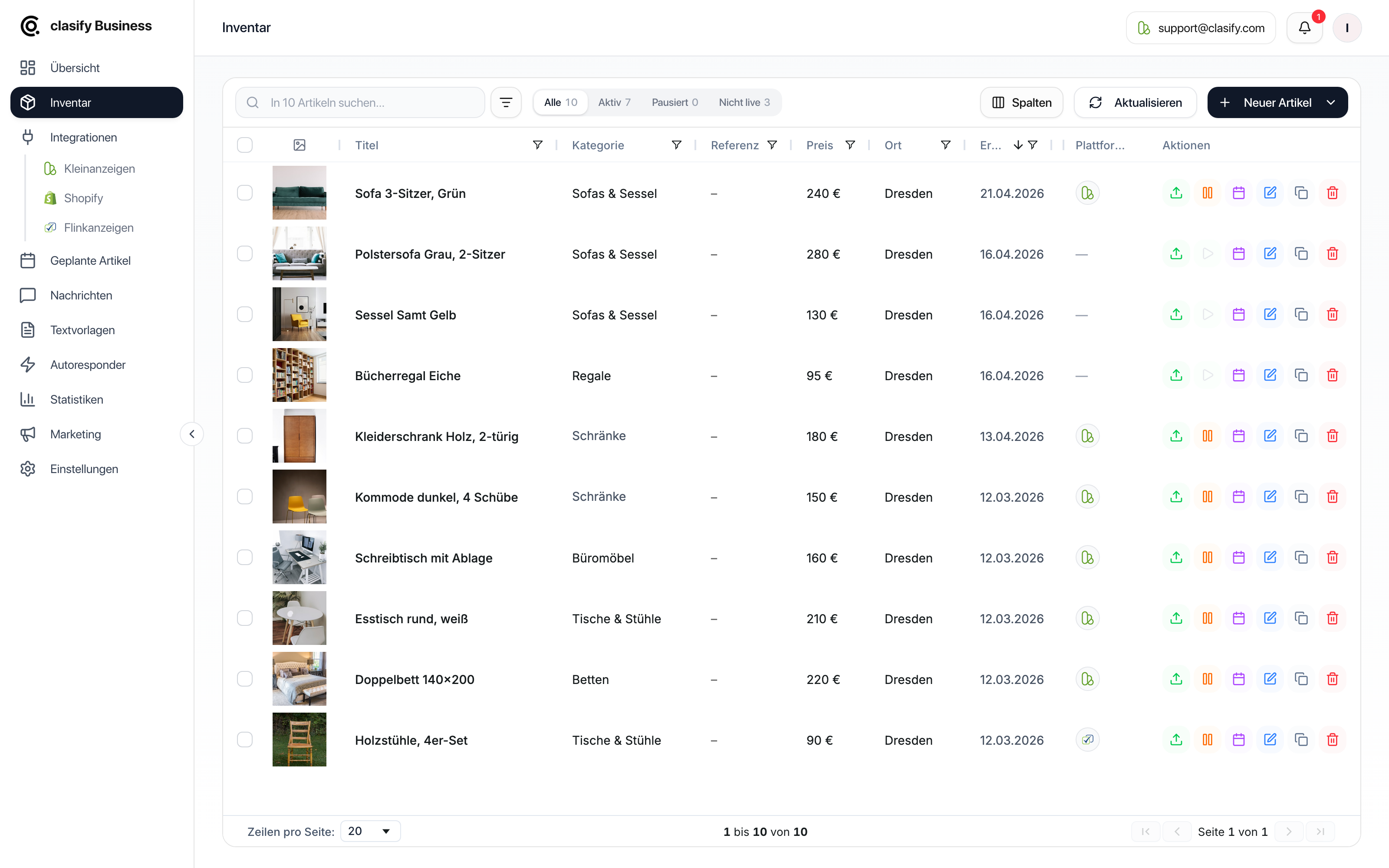
Once an article is in your inventory, you publish it on the connected platforms. Articles get into your inventory manually, via AI, from Shopify, from Google Sheets or from product feeds. You can bring in job ads through the coveto job feed. Clearly organized: live, rolling out and planned.
Available now

Marketplace DE
Fully integrated
Marketplace DE
Fully integrated
Shop system
Import from Plus, sync from Pro
ATS via feed import
Manual from Plus, auto-sync from ProView details →

ERP via feed import
Manual from Plus, auto-sync from ProView details →

JSON, XML, CSV, Google Sheets
Import from Plus, sync from ProUp next

Marketplace EU
Rolling out
Marketplace AT
Rolling outPlanned

Shop system
Planned
Shop system
PlannedYou bring articles into your inventory manually, via AI, from Shopify or through feed import. From Plus, you manually import Shopify products as well as JSON, XML, CSV and Google Sheets data into clasify Business. From Pro, auto-sync takes over the automated sync of products, stock levels, and shop and feed data.
Want more control than the direct Shopify connection offers? With a feed app like Feedyio, you build your own product feed (freely designed descriptions, an exact image order, or separate feeds for multiple locations and Kleinanzeigen accounts) and connect it through feed import. That keeps you in control.
How Shopify works with Feedyio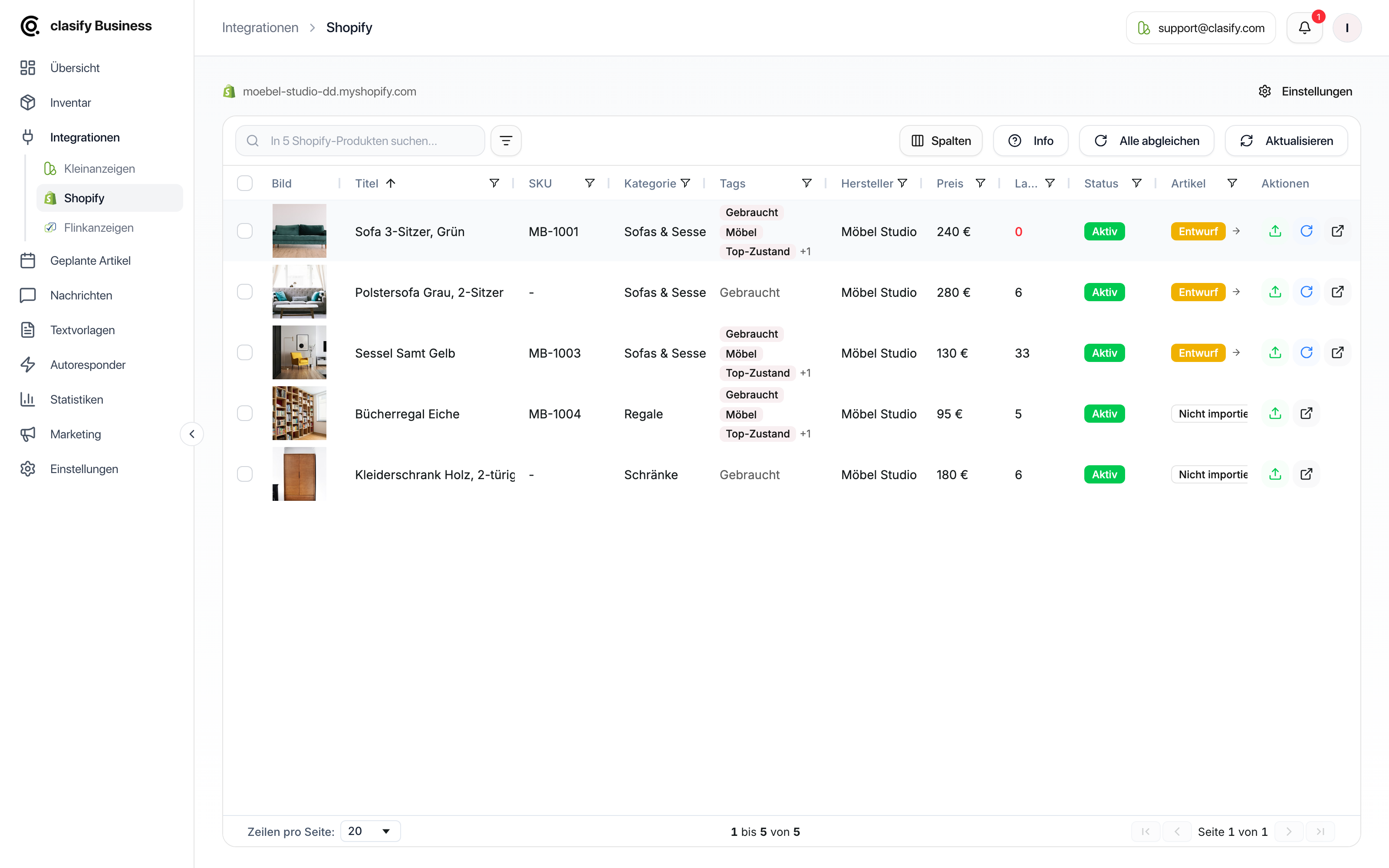
New data source · Live
Bring open positions from coveto into clasify Business through the general feed import: manual sync from Plus, auto-sync from Pro. All you do is enter the JSON or XML URL from coveto. The direct-apply link carries over. The four formatting options are available with Kleinanzeigen PRO Premium; with PRO Basic, the description appears as plain text.
More about the coveto job feedData flow
From job opening to listing
The transfer runs through coveto's job feed. With Plus, you start the sync manually; from Pro, auto-sync takes care of syncing with Kleinanzeigen.
The key workflows, shown in the real product: from image to AI ad creation, from inventory to live ad, and on to messages, scheduling and reporting. The screenshots show the current German interface.
AI creation
Upload product images, add a few notes and let clasify Business prepare the article. AI ad creation produces a draft for you to review and then use in your inventory.

Foundation
All your articles sit neatly in the inventory, ready to be published, scheduled or edited. You maintain your range in one place instead of creating every listing several times by hand.
Publishing
Send articles from your inventory to your connected platforms. All active listings, statuses and actions then sit in a single working view.
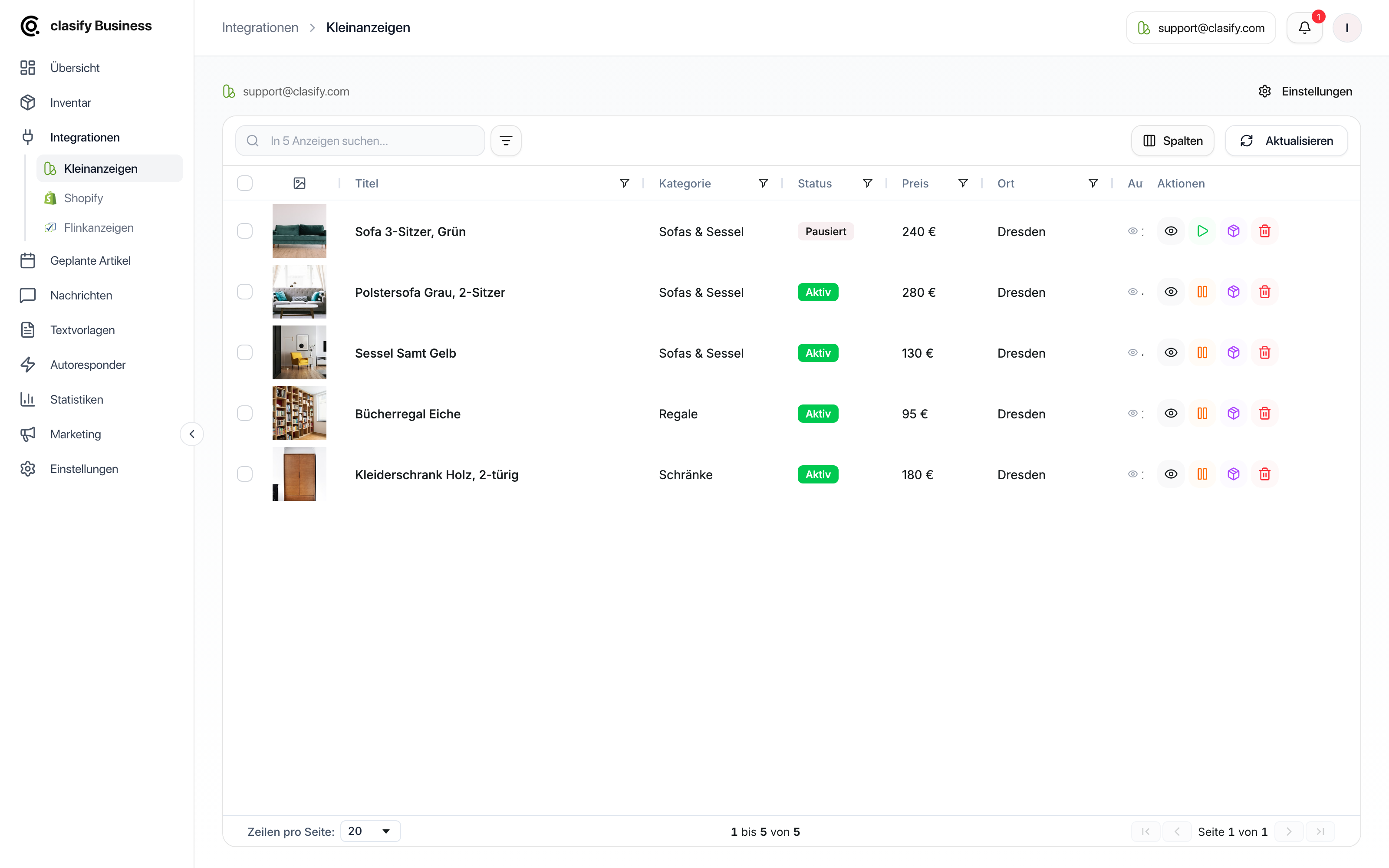
Communication
Messages, simple instant replies and advanced rules all work together. Dealers stay responsive without having to write every standard reply by hand.
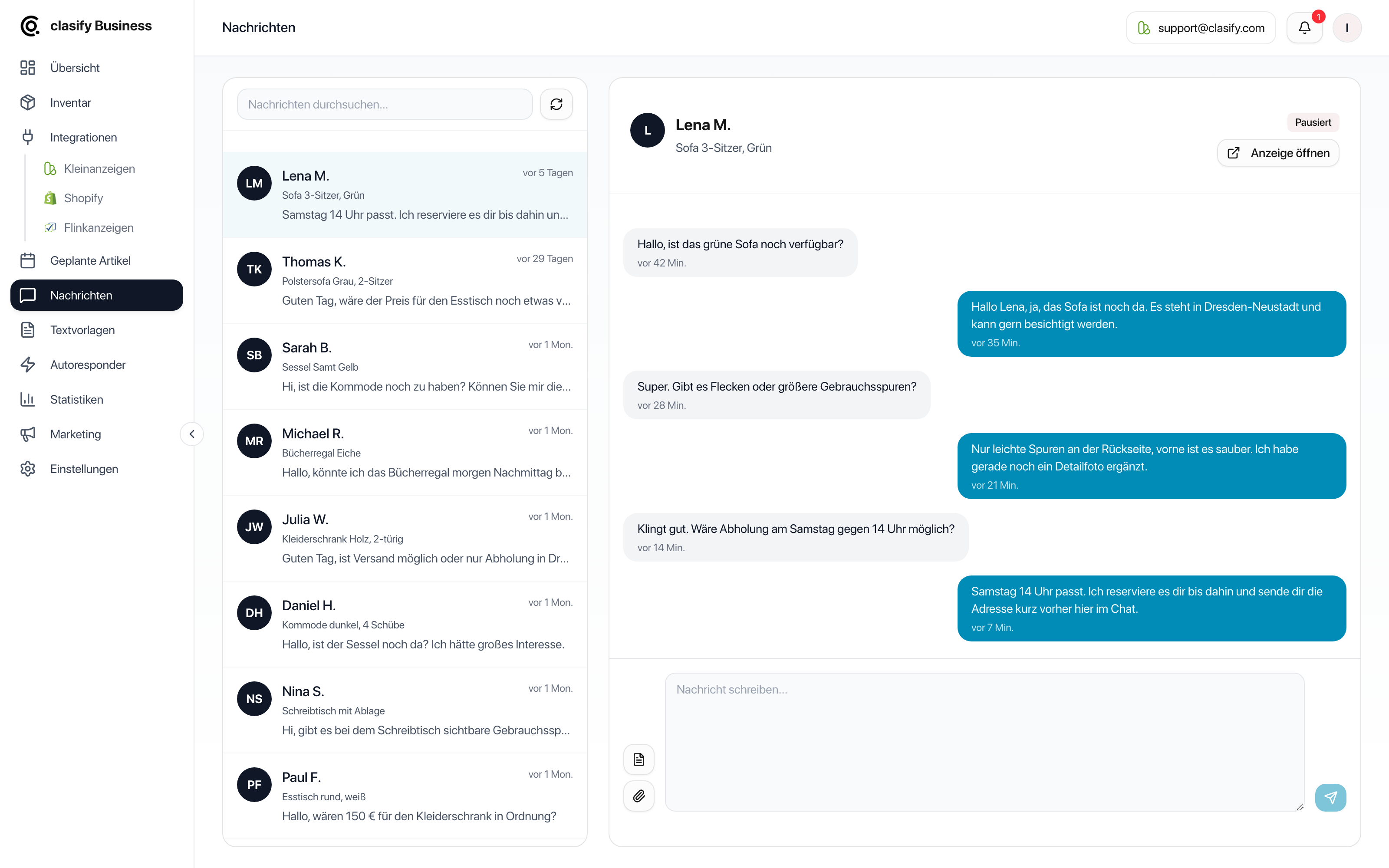


Control
Scheduled publications and performance data turn individual listings into a system you can steer. You can see what goes online when, and how your ads are performing.


Account details, listing profile, AI and platform settings all stay in one place. This view plays a supporting role, but it shows the administrative foundation behind your daily workflows.

If you already work with Kleinanzeigen-Enhanced, you can transfer your existing inventory and key settings to clasify. That moves you to a cloud-based workspace without having to create your articles all over again.
Inventory
Saved articles, images, documents and relevant article data can continue to be used in clasify Business.
Ads
Existing Kleinanzeigen ads can be connected to your transferred inventory, as long as the data is recognized.
Settings
Shopify settings, message setup, autoresponder texts and saved reply texts can be transferred, depending on your setup.
The product tour shows the most important workflows in detail. Here you get the compact overview of all the tools for professional Kleinanzeigen management.
No installation, no local browser. Access your control center from any device: computer, tablet or smartphone.
Manage all your ads in one place. Status, actions and overview, all at a glance.
Maintain articles centrally in your inventory, then publish them to your connected platforms.
Create inventory articles from images and a few short notes.
Edit hundreds of ads at once. Adjust prices, change copy, set a status, all in seconds.
Headings, bold text and lists right in the editor. When publishing, clasify translates them into what Kleinanzeigen can display.
Automatic replies to customer enquiries, with rules for different message content and an adjustable reply delay.
KPIs, trends and a performance overview. Understand your business and fine-tune your strategy.
Plan publications in advance. The calendar takes care of perfect timing.
Have ads automatically republished at set intervals instead of bumping them manually. You choose the interval and end date.
Connect any source as a JSON, XML, CSV or Google Sheets feed. Map the fields in the assistant, and from Pro, auto-sync keeps everything up to date.
Use Shopify, Google Sheets and other feeds manually from Plus or with auto-sync from Pro. WooCommerce and Shopware syncing is planned from Plus.
Work together with your team. Roles, permissions and a shared inventory.
Publish fully on Kleinanzeigen and Flinkanzeigen from a single inventory. eBay and Willhaben are currently rolling out.
Flexible plans for ad volume, inventory articles and autoresponder replies.
Everything you need to get started
Ads = ads active at the same time. Articles = inventory slots. Replies = autoresponder replies per month.
Continue to sign-up. Pay by PayPal, credit card or SEPA. cancel monthly.
Work more efficiently with bulk actions and imports
Ads = ads active at the same time. Articles = inventory slots. Replies = autoresponder replies per month.
Continue to sign-up. Pay by PayPal, credit card or SEPA. cancel monthly.
For professional dealers
Ads = ads active at the same time. Articles = inventory slots. Replies = autoresponder replies per month.
Continue to sign-up. Pay by PayPal, credit card or SEPA. cancel monthly.
For dealers with a team and high volume
Ads = ads active at the same time. Articles = inventory slots. Replies = autoresponder replies per month.
Continue to sign-up. Pay by PayPal, credit card or SEPA. cancel monthly.
All plans require a Kleinanzeigen PRO or real estate package from kleinanzeigen.de.
New: clasify Business Startklar, our done-for-you setup service
Shop or feed connection, linked ads and autoresponder. Done in 5–10 business days.
€500
+ 1st month of Pro free
Extend your plan with additional inventory slots, ad slots or team members.
Note: Add-ons are billed monthly, even on yearly plans.
For requirements beyond our standard plans, we'll put together a suitable offer for you through our contact form.
Use only the autoresponder, without a full Business plan: autoresponder-only plans on request, rules for common enquiries and a plan size that matches your message volume.
Request an AR plan →Multi-account, maximum power, VIP support: custom limits, dedicated onboarding with a 1:1 setup call, multi-account for agencies, custom integrations and an SLA guarantee.
Request a quote →The inventory is your central product database in clasify Business. You maintain an article with all its data, images and documents exactly once, then publish it on one or more platforms of your choice, currently Kleinanzeigen.de and Flinkanzeigen. Important: an article in your inventory is deliberately separate from the actual live ad. The inventory is your clean data foundation, and the ad is one specific publication from it. That way, you maintain a product once and publish it many times, instead of managing every listing individually.
The difference from Kleinanzeigen-Enhanced: there, your inventory was stored locally in your browser and geared toward Kleinanzeigen.de. In clasify Business, it lives in the cloud, is accessible from any device and is built from the ground up to work across platforms: the same article can be published on multiple platforms without you creating it more than once. If you're coming from Kleinanzeigen-Enhanced, you can transfer your existing inventory instead of rebuilding it.
You upload images, add short notes such as brand, condition or shipping, and start the AI ad creation. From that, clasify Business prepares an inventory article with a title, description, category and suggested price. You then review the data and publish the article from your inventory on the connected platforms.
Yes. You can transfer your inventory and key settings from Kleinanzeigen-Enhanced to clasify. Depending on your setup, clasify Business can also take over images, documents, links to live ads, Shopify settings, message settings, autoresponder texts and saved reply texts. You'll find the detailed guide at Transferring data from Kleinanzeigen-Enhanced to clasify.
Kleinanzeigen.de and Flinkanzeigen are currently fully integrated. The Shopify connection is also available: manual import from Plus, automatic sync from Pro. WooCommerce and Shopware are planned as sync from Plus.
Feed import for JSON, XML, CSV and Google Sheets is available from Plus, with automatic sync from Pro. More platforms such as eBay and Willhaben are rolling out. The range of features depends on your plan and the integration.
The coveto job feed is also live as a data source. It lets you bring open positions from the applicant tracking system coveto into clasify Business and sync them with Kleinanzeigen, manually from Plus or automatically from Pro.
Open positions come into clasify Business through the coveto job feed. There, you review the ads created from them and publish them on Kleinanzeigen. An application form link stored in the feed is carried over as a direct-apply link. With Kleinanzeigen PRO Premium, clasify converts HTML descriptions into the four available formatting options; with PRO Basic, the description is shown as plain text without this formatting. With Plus, you start the sync manually; from Pro, auto-sync takes over. You'll find the feed link in coveto under "Werkzeuge → Teilen und Einbetten" (Tools → Share and Embed). In clasify Business, then open "Integrationen → Feed-Import" (Integrations → Feed import) and paste the JSON or XML URL there. There is no separate coveto integration. The step-by-step guide shows the complete setup. Applications and their processing stay in coveto.
Yes, with clasify Business Startklar. For a one-off €500 net, we set up the sync from your shop or feed to Kleinanzeigen, link your existing ads and set up the autoresponder. After 5–10 business days, everything is running. Optimizing your ads is not included. You need clasify Business Pro or Premium; as a new customer, you pay €0 for your first month of Pro. More about Startklar
Yes, you can upgrade to a higher plan at any time. The difference is charged pro rata. Alternatively, you can extend your current plan with add-ons.
Yes, we offer special autoresponder plans for that. They are based on your ad volume and the rule volume you need. The autoresponder currently works only for Kleinanzeigen.de. To get the right autoresponder plan, simply request it through the contact form.
Yes. When scheduling an ad, turn on "Wiederholen" (Repeat) and set the interval and end date, for example every two weeks. clasify republishes the ad automatically on each date, so it appears at the top again. You see a preview of all dates beforehand. You'll find the details in the help section.
clasify Business reads CSV, JSON and XML. You can connect publicly shared Google Sheets directly by URL. For Excel files, simply export them once as CSV. In the mapping assistant, you connect the columns of your source to the fields of an inventory article. You'll find a step-by-step guide in the help section.
You write descriptions in an editor with headings, bold and lists. Those are exactly the four formats Kleinanzeigen supports, and clasify converts them accordingly when publishing. Everything else becomes plain text. Whether formatting is displayed in your ads also depends on your Kleinanzeigen package. More on this in the help section.
We don't offer a classic free trial. Instead, you can cancel clasify Business monthly, so you can start risk-free and without a long commitment. If you like, use the voucher code CLASIFY30 when you start and get 30% off your first 6 months, also with monthly cancellation.
One click opens ChatGPT or Claude with our official information and the help section as context. Then just ask your question there.
You'll be redirected to an external AI provider, and you may need an account there. Answers can contain errors. You'll find binding information in our help section.
Questions about clasify Business? We're happy to help.
Let's work out together which plan suits your volume and how clasify Business fits into your workflow.
All brands, product names and logos mentioned are the property of their respective owners. They are used here solely to describe the supported integrations.