
Settings
In the settings you define basics that affect many workflows. These include profile, location, legal notice, shipping, AI defaults, platform limits, Shopify settings and subscription.
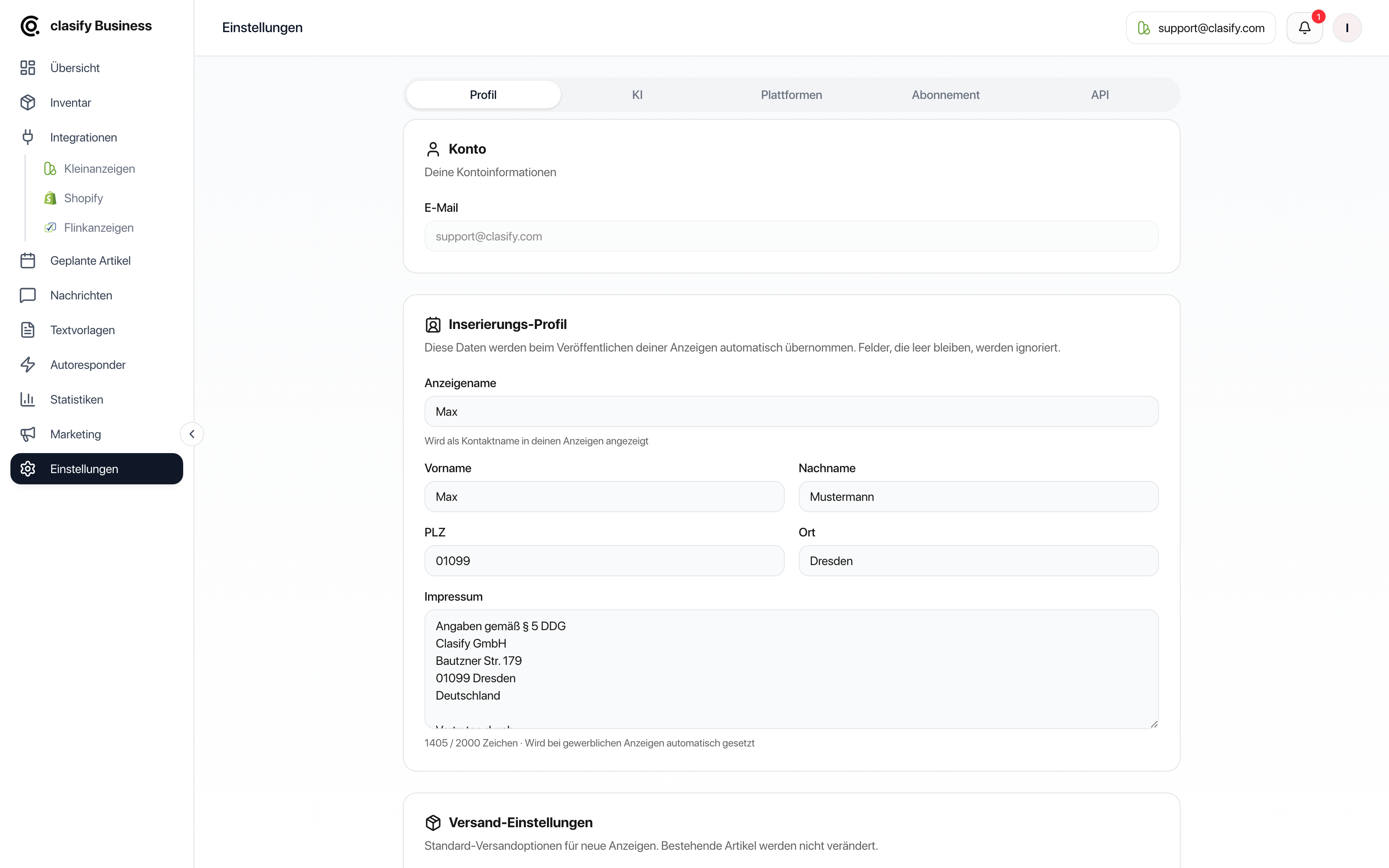
Profile
Section titled “Profile”The Profil (Profile) tab has three sections.
Account
Section titled “Account”The Konto (Account) section shows the email address of your clasify login.
Listing profile
Section titled “Listing profile”clasify takes over these details when creating and publishing ads (Inserierungs-Profil, Listing profile). Fields that are left empty are ignored.
- Display name, shown as the contact name in your ads.
- First name and last name.
- Postal code (PLZ) and city.
- Legal notice (Impressum), maximum 2000 characters.
The display name, location and legal notice are especially important. Without them, ads may be created incorrectly or not at all.
Shipping settings
Section titled “Shipping settings”Default values for new ads (Versand-Einstellungen, Shipping settings). Existing articles are not changed by this.
- Abholung (Pickup): Active by default.
- Versand (Shipping): If active, you can also set a custom shipping price in euros (individueller Versandpreis).
Support access
Section titled “Support access”With the Support-Zugriff erlauben (Allow support access) switch, you allow our support team to look into your account when you send a request. This speeds up troubleshooting considerably because we can see articles, settings and error messages directly.
Access is off by default and can be turned off again at any time.
In the KI (AI) tab you set the defaults used for AI article creation:
- Beschreibungs-Prefix (Description prefix): Text before every AI description.
- Beschreibungs-Suffix (Description suffix): Text after every AI description.
- KI-Instruktionen (AI instructions): General guidance, for example tone of voice or phrases to avoid.
Examples:
Please keep the wording factual and short.Do not use emojis.Always point out that pickup is preferred.
Platforms
Section titled “Platforms”In the Plattformen (Platforms) tab you can set the maximum title length per platform. Longer titles are shortened accordingly when publishing.
Defaults:
- Kleinanzeigen: 65 characters. With a real estate package, up to 200 characters are possible on Kleinanzeigen.
- Flinkanzeigen: 100 characters.
Values between 10 and 300 characters are allowed. Only set as much as your Kleinanzeigen package actually allows, otherwise publishing may fail.
You can also find the title length for Kleinanzeigen under Integrationen > Kleinanzeigen > Einstellungen (Integrations > Kleinanzeigen > Settings). There you also manage your connected Kleinanzeigen accounts in the same area.
Shopify settings
Section titled “Shopify settings”Connected Shopify stores have their own settings. There you control, among other things:
- Price calculation and VAT conversion.
- Default price type.
- Postal code and title metafields.
- Description metafield.
- Shopify description builder from Pro.
- German Shopify translations.
- Price rounding to whole euros.
- Shipping defaults for newly imported articles.
- Sync fields for price, title, description, images and postal code.
- Automation for auto-sync and auto-publish.
You can find more under Import and sync Shopify products.
Subscription
Section titled “Subscription”In the Abonnement (Subscription) section you see your current plan, your usage, your limits, invoices and access to subscription management.
You can find more under Subscription, limits and features.
Save settings
Section titled “Save settings”-
Open Einstellungen (Settings).
-
Select the relevant tab.
-
Change the details you want.
-
Click Speichern.
-
If you switch away from a tab with unsaved changes, decide whether to save or discard them.
When settings matter most
Section titled “When settings matter most”- Before your first publication.
- Before Shopify imports.
- When ads are not published because of missing information.
- When your location, legal notice or shipping changes.
- When AI descriptions should always have a certain style.
- When Shopify prices are taken over from a country with a different VAT rate.
- When Shopify descriptions should be composed from several fields.